

Description
Stanford Football Theme for Browser
Overview
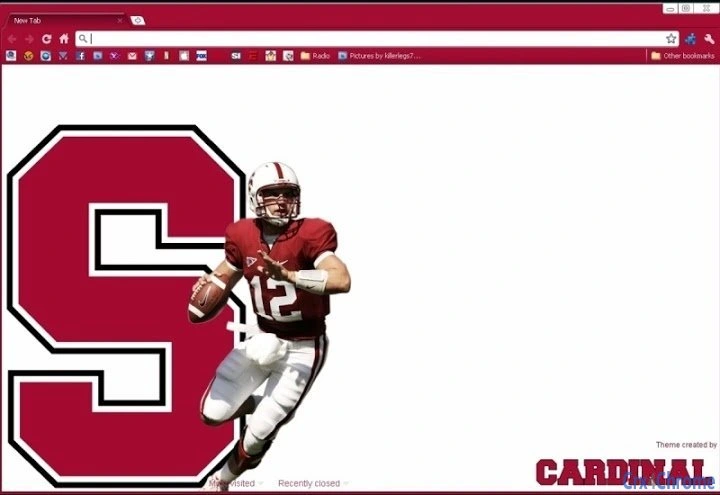
The Stanford Football Theme for Browser is a desktop utility designed to personalize the browsing environment for fans of college football, particularly supporters of the Stanford Cardinal. Tailored for users who want to express team pride, the theme transforms the appearance of compatible browsers with Stanford-themed visuals, including the iconic cardinal red and white color scheme, team logos, and football-inspired design elements. This software is ideal for students, alumni, and sports enthusiasts who follow NCAA football and enjoy immersive digital experiences.
It addresses the need for visual identity customization in everyday digital tools, allowing users to maintain a consistent connection to their favorite team throughout their online activities. The theme is especially useful during game days, seasons, or major college football events when fans want to showcase their allegiance. While the developer did not provide additional background details, the theme appears to be created with a focus on fan engagement and aesthetic appeal.
Key Features & Capabilities
- Stanford Cardinal Design – Features the official team colors, logo, and football-inspired graphics to create a cohesive visual identity.
- Browser Integration – Seamlessly applies to supported web browsers, enhancing the appearance of tabs, bookmarks, and home page.
- Easy Activation – Simple installation process with minimal steps required to apply the theme.
- Seasonal Relevance – Designed to support fan engagement during the college football season and major events.
- Lightweight Design – Small file size ensures quick installation and minimal impact on browser performance.
Users can apply the theme to create a dedicated fan environment, ideal for tracking game schedules, following team news, or sharing content on social media. The theme’s visual consistency helps reinforce team spirit and enhances the overall browsing experience for fans. It is particularly effective when used alongside other Stanford-related digital content.
User Interface, Workflow & Performance
The user interface of the Stanford Football Theme is minimal and focused on visual customization. It does not include interactive controls or settings menus, as it functions as a passive theme rather than a full-featured application. Navigation is handled entirely through the browser’s built-in theme management system, which ensures a familiar workflow for users.
Workflow efficiency is high, as the theme can be applied with a single action after installation. The developer did not specify resource usage details, but given the small file size of 1.2 MB, the impact on system performance is expected to be negligible. No performance issues were reported in the provided information, and the theme is designed to operate in the background without interfering with browsing tasks.
Stability is assumed to be consistent with standard browser theme behavior, though exact behavior under heavy usage or with multiple extensions was not documented. General software behavior patterns suggest that the theme will remain functional across updates, provided the browser remains compatible.
Compatibility & System Requirements
The software is compatible with Windows and Mac operating systems, supporting both platforms for desktop users. The version is listed as 1.0, indicating a stable initial release. The installation size is 1.2 MB, which is compact and suitable for users with limited storage.
Exact system requirements were not listed. Platform compatibility information is limited to the operating systems specified. No hardware specifications were provided. The developer did not indicate whether the theme supports specific browser versions or requires a minimum OS build. Users should ensure their browser is up to date to maintain compatibility.
Pros and Cons
Pros
- Visually appealing design aligned with Stanford Cardinal branding
- Lightweight and fast to install
- Easy to apply and use with no complex setup
- Perfect for fans wanting to express team pride
- Free to download and use
Cons
- No customization options beyond the default theme
- Dependent on browser support for theme application
- Does not offer interactive or functional features
- Limited to visual changes, no additional utilities
- Exact system requirements not specified
FAQ Section
Is the Stanford Football Theme free to use?
Yes, the theme is available at no cost. There are no subscription fees or in-app purchases required.
Which browsers are supported?
The theme is designed for use with browsers that support custom themes. Specific browser compatibility was not provided, but it is expected to work with major browsers on Windows and Mac.
Can I use this theme offline?
Yes, once installed, the theme functions entirely offline. No internet connection is required to maintain the visual appearance.
How often are updates released?
The current version is 1.0. No information was provided about update frequency or future releases.
Is the theme secure to install?
As a browser theme distributed through standard channels, it is considered safe. However, users should only install themes from trusted sources to avoid potential risks.
Final Thoughts + CTA
The Stanford Football Theme for Browser delivers a focused, fan-centric experience with a clean, professional design. While it serves a narrow purpose—visual customization—it does so effectively for its intended audience. The lightweight nature, free access, and strong branding make it a valuable tool for college football supporters who want to keep their digital space aligned with their team spirit. It’s not a utility with advanced features, but it excels in its core function: enhancing the browsing experience with pride and personality.
For students, alumni, and passionate fans of the Stanford Cardinal, this theme offers a simple yet meaningful way to stay connected to the team. Its minimal footprint and ease of use ensure it won’t disrupt daily workflows. The lack of customization options is a limitation, but it’s acceptable for users seeking a straightforward, branded experience.
Download Stanford Football Theme now
Guides & Tutorials for Stanford Theme for Chrome
How to install Stanford Theme for Chrome
- Click the Preview / Download button above.
- Once redirected, accept the terms and click Install.
- Wait for the Stanford Theme for Chrome download to finish on your device.
How to use Stanford Theme for Chrome
This software is primarily used for its core features described above. Open the app after installation to explore its capabilities.
User Reviews for Stanford Theme for Chrome 0
No reviews found





